
Tech Radar
The Tech Radar is a read-only governance view. It shows which technologies (models, agentic patterns, knowledge techniques) the organization has decided to adopt, trial, assess, or hold, next to the assets the catalogs already describe. Decisions are managed in a single YAML configuration file. The portal renders that file and offers no write path, so governance stays auditable through whatever review process already owns the file.
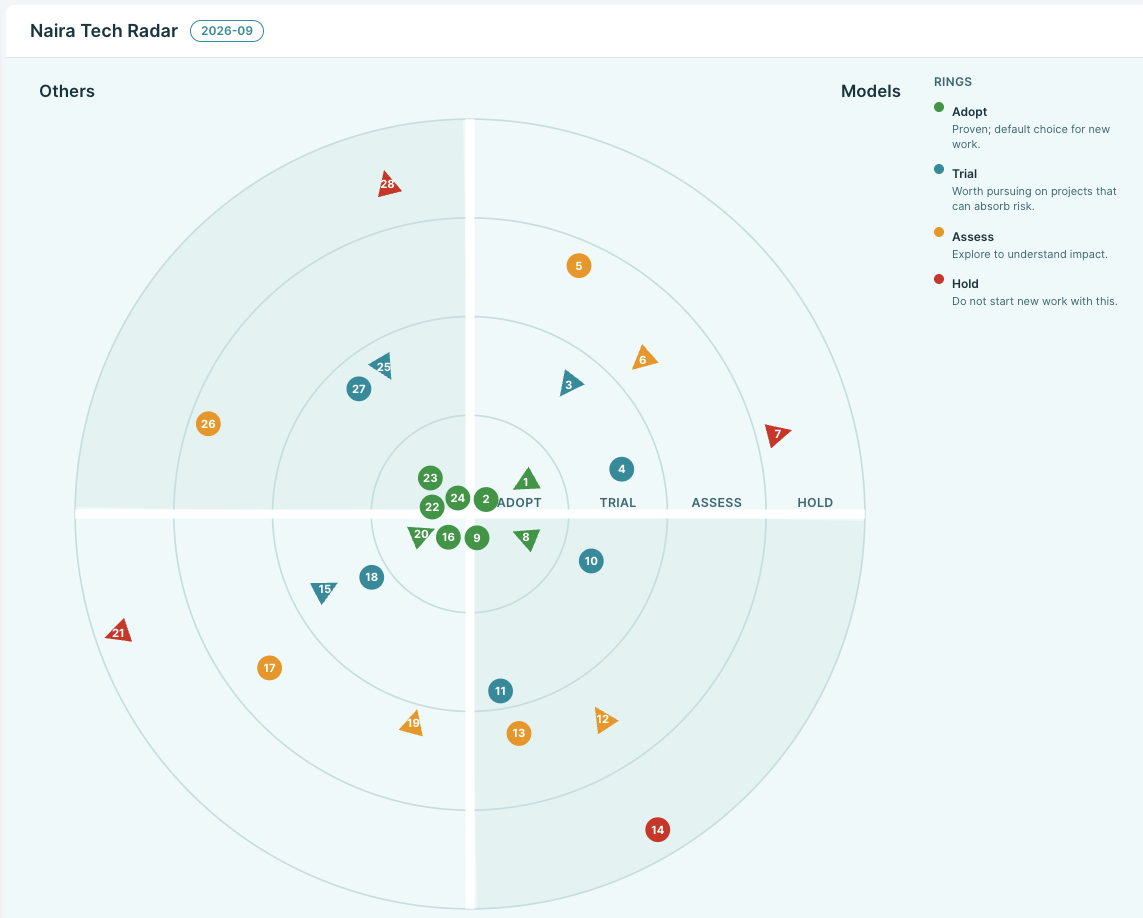
The radar deliberately carries no links into the catalog. It expresses the organization's target vision, not what is currently deployed or in use.
How it works
The radar is provided by the tech-radar plugin:
The plugin reads the config file (default
/etc/naira/techradar/radar.yaml, overridable via theTECH_RADAR_CONFIG_PATHenvironment variable) on every collect, so changes take effect on the next sync without a redeployment.A valid file becomes one
tech_radarnode (radar metadata plus the quadrant and ring taxonomies) and onetech_radar_entrynode per entry.An invalid file fails the collect with errors naming the offending line, field, and reason. A failed collect never touches the store, so the previous radar stays visible ("last known good"). The errors appear in the plugin log and in the sync operation's error message on the Plugins page.
Radar data is served by the standard catalog API, with no dedicated endpoints:
GET /v1/nodes?filter=kind="tech_radar"
GET /v1/nodes?filter=kind="tech_radar_entry"
INFO
The catalog store is in-memory: after a catalog restart the radar (like all catalog data) is empty until the next plugin sync runs.
Using the radar
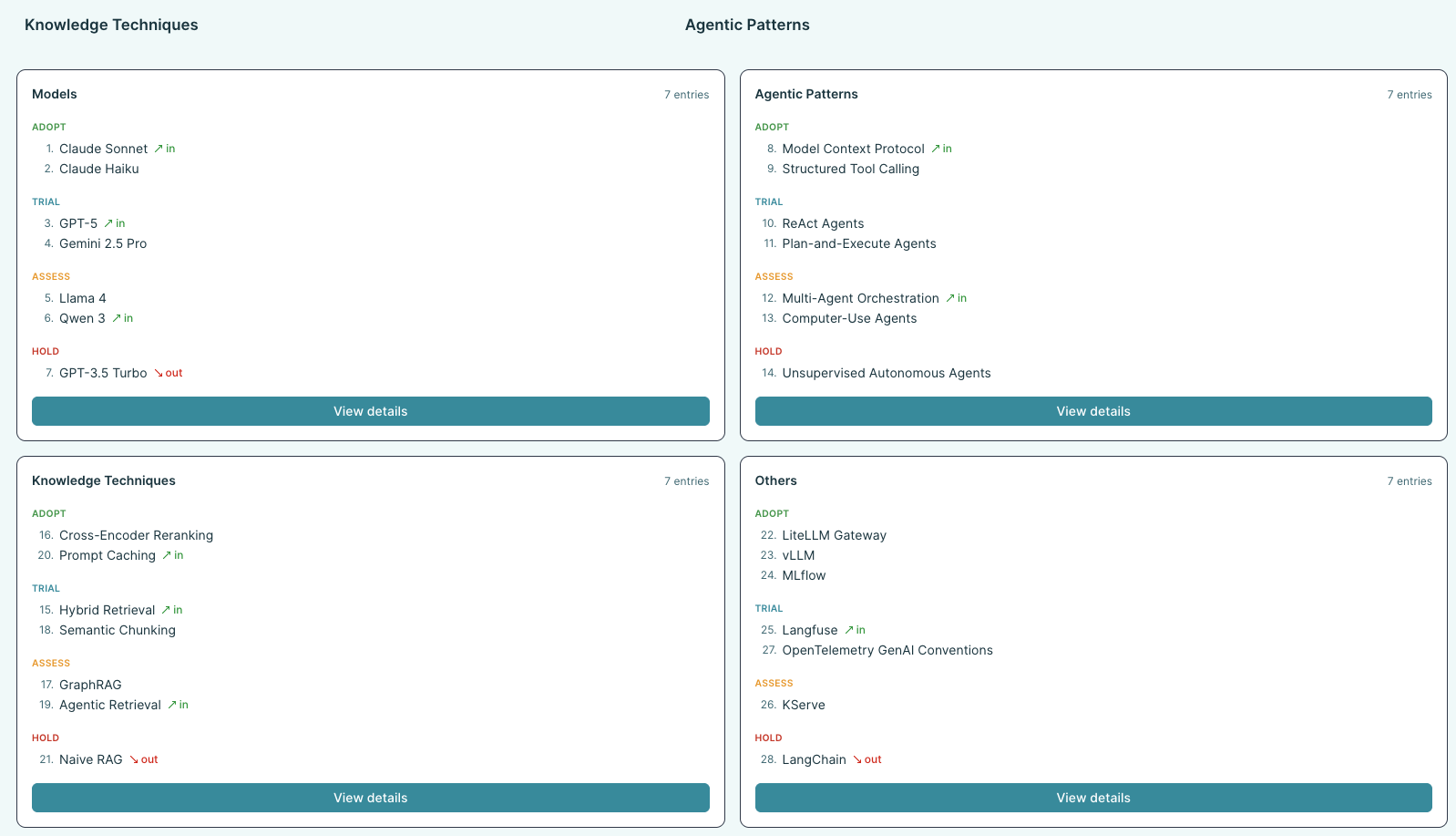
Open Tech Radar in the portal. The overview shows the radar circle, the ring definitions, the edition label, and the count of entries that moved since the previous edition. Each quadrant links to a filterable table with every entry's rationale, so the "why" behind each placement is always one click away.
Updating the radar
In the dev environment, the config is mounted from the tech-radar-config ConfigMap. The ConfigMap is mounted as a directory, not via subPath, so edits propagate into the running pod (the kubelet syncs it within about a minute).
- Edit the config:
kubectl -n idp-system edit configmap tech-radar-config. - Wait for the kubelet to sync the mounted file (~1 min).
- Trigger a sync from the portal's Plugins page, or
POST /v1/plugins/tech-radar:run(orPOST /v1/plugins:run). - Reload the Tech Radar page in the portal.
If the sync fails, the operation on the Plugins page shows the validation errors. The previously synced radar keeps rendering until a valid config syncs successfully.
Because the radar is driven by a plain mounted file, the mechanism composes with any external GitOps tooling: keep radar.yaml in a reviewed repository and let your delivery pipeline update the ConfigMap.
Configuration schema
schema_version is required and must be 1.
| Field | Required | Description |
|---|---|---|
schema_version | yes | Schema version; only 1 is accepted. |
radar.id | no | Radar identifier, defaults to default. Becomes the node path prefix (<radar.id>/<entry.id>). |
radar.title | yes | Display title of the radar. |
radar.edition | yes | Free-form edition label, e.g. 2026-09. |
radar.owner | yes | Owning team or board. |
quadrants | yes | Exactly 4 quadrants, in display order. Each has id and name. |
rings | yes | 1-6 rings, ordered innermost to outermost. Each has id, name, and an optional description. |
entries | yes | The radar entries. Must be present; use [] for a radar without entries. Omitting the key is a validation error, so an accidentally deleted block cannot silently wipe the radar. |
entries[].id | yes | Stable identifier; with radar.id it forms the node path. |
entries[].name | yes | Display name. |
entries[].quadrant | yes | Must match a declared quadrant id. |
entries[].ring | yes | Must match a declared ring id. |
entries[].moved | no | in, out, or none (default). Movement since the previous edition. |
entries[].owner | yes | Team accountable for the decision. |
entries[].rationale | yes | Why the entry sits in its ring. |
All id fields must match ^[a-z0-9][a-z0-9_-]*$ and be at most 100 characters. Ids become node paths, so oversized ids are rejected rather than clipped. Unknown fields are rejected, so typos surface as validation errors instead of being silently ignored. Entry order in the file is canonical: it drives the numbering on the radar chart and in the quadrant summaries.
Free-form text is clipped rather than rejected, so an oversized value never blocks a sync. Short labels (titles, names, owners, the edition) are capped at 200 characters and long-form text (an entry's rationale, a ring's description) at 2000, each with a trailing ellipsis and a warning in the plugin log.
Annotated example
schema_version: 1            # required; only 1 accepted
radar:
  id: naira                  # optional, default "default"
  title: Naira Tech Radar    # required
  edition: 2026-09           # required; free-form edition label
  owner: platform-team       # required
quadrants:                   # required; exactly 4; order = display order
  - id: models
    name: Models
  - id: agentic
    name: Agentic Patterns
  - id: knowledge
    name: Knowledge Techniques
  - id: others
    name: Others
rings:                       # required; 1-6; order = innermost to outermost
  - id: adopt
    name: Adopt
    description: Proven; default choice for new work.
  - id: trial
    name: Trial
    description: Worth pursuing on projects that can absorb risk.
  - id: assess
    name: Assess
    description: Explore to understand impact.
  - id: hold
    name: Hold
    description: Do not start new work with this.
entries:
  - id: claude-sonnet
    name: Claude Sonnet
    quadrant: models         # must match a quadrant id
    ring: adopt              # must match a ring id
    moved: in                # in | out | none; default none
    owner: ml-platform
    rationale: >
      Default general-purpose model; served through the central gateway.
  - id: naive-rag
    name: Naive RAG
    quadrant: knowledge
    ring: hold
    moved: out
    owner: ai-board
    rationale: >
      Superseded by hybrid retrieval; migrate existing pipelines.
Out of scope
In-portal editing, historic editions, enforcement of radar decisions, multiple radars per instance, and Git-based config sync are all out of scope for now. The mounted-file mechanism composes with any external GitOps tooling.